Mrs. Newell's Math: Student Activity

Showing posts with label Student Activity. Show all posts

Introducing Slope Formula

Saturday, September 17, 2022

File for the Post: Introducing Slope Formula


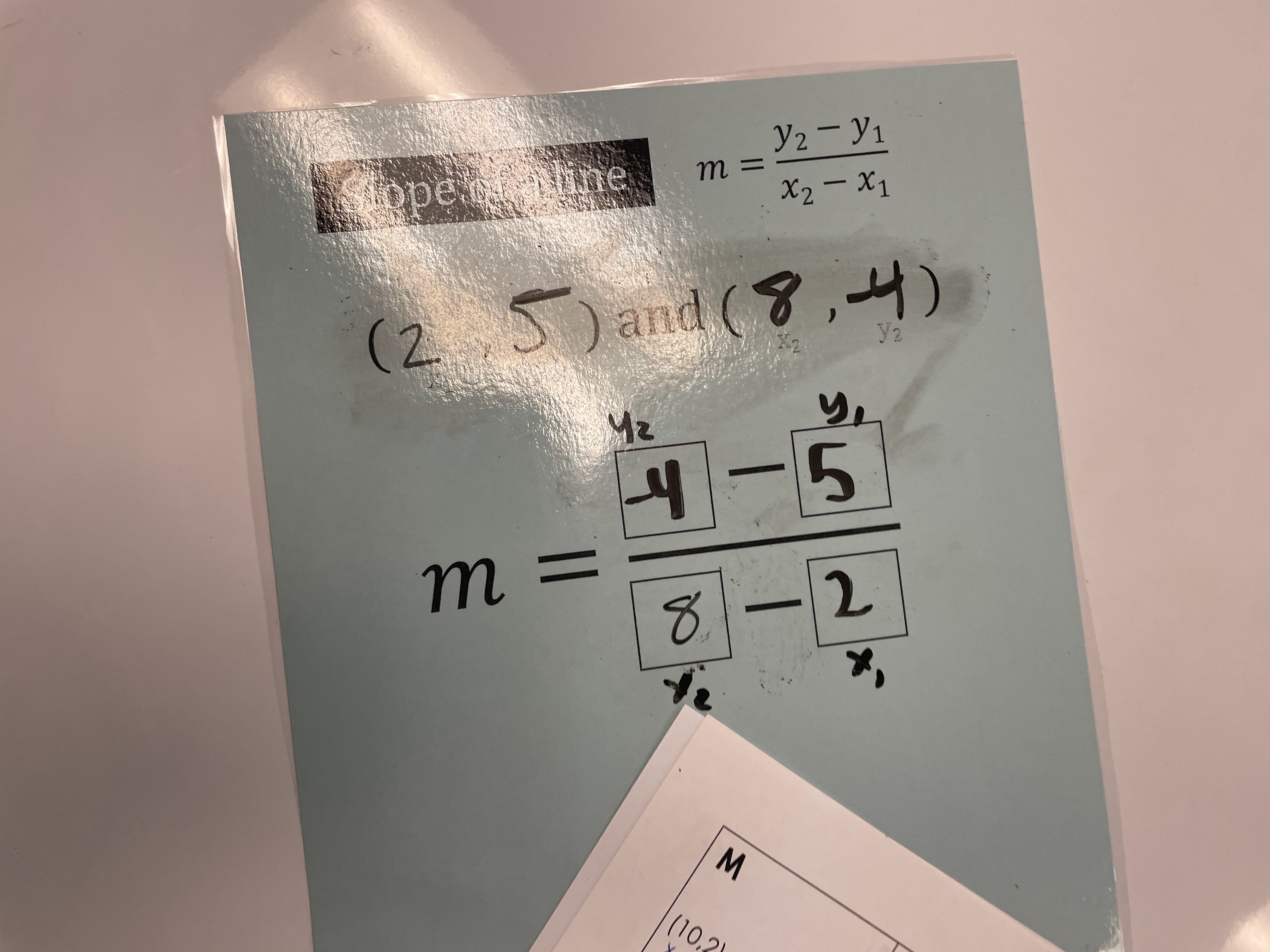
This week, we began our Chapter 3 “Linear Functions” unit. My team introduces Linear Functions by first teaching how to find the slope from two ordered pairs and a given table. We strongly emphasize using the slope formula, since it is on the student's Algebra 1 Formula Chart. 


This year, I decided to create and laminate a “Slope Formula” template for students to write on with Expo Markers (HIGHLY recommend it)! To be honest, I didn’t think a majority of students would like to write on the sheet, but I was wrong. This was very successful (especially in our Algebra 1 co-teach classes).


After the notes, students completed the following cut-and-paste activity. Students had to match ordered pairs and tables that have the same slope. Students really enjoyed this activity and felt confident using the slope formula by the end of the class period!


Any interesting ways that you teach the slope formula? Would love to hear more successful teaching strategies!


0

Exponents Day 1 and Day 2

Monday, February 3, 2020
THIS IS MY 100TH POST! One of my goals this month is to write a blog post twice a week. I know I say that every post BUT I really want to start sharing more of my instructional materials. This past Friday, students took their test over Exponents and did extremely well. I strongly suggest introducing the rules for negative and zero exponents at the beginning of the unit.

For notes, I created a flip-book over Exponents that we used for the whole unit. This was the first unit that students regularly referenced their flip-book. 


On Day 1 and Day 2, we went over Product of Powers and Quotient of Powers. After the Product of Powers and Quotient of Powers flap, students worked on a partner activity. Students always enjoy partner activities because they are able to work with each other and make sure they received the same answer. If students do not receive the answer, they check both of each others work to come up with the correct solution.


This post summaries day 1 and day 2 of our exponents unit and I can't wait to post about the remaining days on Wednesday! 

If you want the files -> Click Here

2

Linear Functions 1-100 Game Board

Friday, September 27, 2019
Algebra 1 classes did their first 1-100 Game Board of the year and they loved it! First, we completed notes over graphing linear functions in standard form and then students broke into pairs to complete the Game Board activity.


Create a set of game cards with 3-6 questions on each card. Keep the level of difficulty in mind when creating the amount of questions on each card. Also, create enough cards to last the whole class period.

Cut the cards into strips to make it easier for you/students to pick up new cards when they need a new set. I would not recommend giving students all the cards/questions at once. 

I print out a student tracking sheet for easy grading and to ensure that students are receiving the correct card. Hint: Create enough questions to last the entire amount of time to reduce student down-time. 


Once a group finishes their card, they raise their hand to get their work checked. If students answered the card correctly, they are able to go write their "team name" on a number on the Game Board. After they write their name on a number, they grab the next set of cards. 


During the last 5 minutes of class, I press the "Go" button and randomly select 5 numbers. Prizes include a piece of candy, a high five, extra points on a quiz, or a homework pass. 

I would love to hear any of your go-to review day activities!


Files can be found here: 


2

Literal Equations With Google Slides

Friday, August 24, 2018

I like teaching literal equations because I feel that if students can understand how to manipulate and work with variables, then they will probably be successful in Algebra. From past experience, students often need to work on several practice problems with the teacher. This year, I decided to create a Google Slides activity that provided the general outline of the equation.

Below are pictures of some interactive notebook pages over solving literal equations. I ended up changing up some of the problems from the literal equations book because they matched with the Google Slides activity.


After the notes, students will complete the following Google Slides activity over solving literal equations. Students are able to drag answers on top of the blank boxes provided (Not all boxes will be used).


I haven't decided on what we are going to use for the second day of solving literal equations.... still working on it! I would love to hear how you teach your students how to solve literal equations!
11

Algebra 1 Quadratics Unit

Thursday, March 22, 2018
We are finishing up our Quadratics unit in Algebra 1 and I wanted to share some of my favorite foldables and activities.

Below is a cut and paste activity that we did as soon as we finished going over the basic key terms of quadratics. For the ROXS column, I tell my students that the acronym stands for Roots, Zeros, X-Intercepts, and Solutions to help them with the vocabulary. Students did extremely well on this activity and in hindsight, I did not know how much I would appreciate adding the factors columns.


Here are some Transformations of Quadratics interactive notebook pages that I used. I really liked these pages because students were able to visually see the transformation and explain what was "happening."


 After the foldable, students worked on their first partner activity of the new year. I forgot how much collaboration and communication occurs when students work together on partner activities. Students really enjoy checking their answers with a partner!


We spent two days covering transformations of quadratics and on the second day, students completed the following Desmos Challenge that was created by MathyCathy and Michael Fenton:


I absolutely LOVED this Desmos Challenge and so did students. If there are any more Desmos challenges similar to this one, please send them my way!

This is all we were able to cover before Spring Break so I knew I had to create a review game when students came back. I ended up making a PPT review game where class periods ended up competing for the most point. The class period that received the most points received a jolly rancher and free homework pass. I don't know about your students, but my students LOVE companions!


The following day, we went over the vertex form in their notebook and completed a Google Slides activity in Schoology. Below is a Google Slides activity that I assigned to students where they had to copy and paste the triangle to the correct location.


Thank you so much for taking the time to read this post. If you end up trying some of these activities and foldables, I would love to know!


If you would like to use the activities and foldables, click on the links below:


7

Quadratic Formula Activity

Thursday, February 15, 2018
Here goes another cut and paste activity :)

I was worried about introducing the Quadratic Formula because of the numerous steps that students have to follow. Some of my lower level students often get stuck trying to complete three step problems (hence my nervousness). I printed off a class set of Math Equals Loves Quadratic Formula templates and stuck them in a dry erase sleeve (https://mathequalslove.blogspot.com/2016/02/quadratic-formula-templates.html) and had students practice on them throughout the notes. 

After the notes, we completed the following cut-and-paste activity over the Quadratic Formula. Students had to identify the answer and the box that correctly plugged the numbers into the formula.


One word.... SUCCESS!

Today, students took their test over polynomials and solving quadratics and I am SO proud of all their hard work! It definitely showed on their tests today. Below is the file to the activity if you would like to use in your classroom. As always, I appreciate ANY feedback or suggestions. :)


7

Systems of Equations

Wednesday, February 14, 2018
I am in LOVE with this flip book that I made for systems of equations in Algebra 1. It is basically a review of all topics that are covered in systems and is organized so that students have a quick go-to reference. We did not complete the flip-book (evens only) and I am planning to finish the odds when we do our STAAR review in May.


Students were struggling with the concept of creating a system with a given amount of coins. So, another teacher had a great idea of creating a Google Slides document where students can practice solving systems with a partner. The following Google Slides document was uploaded into Schoology so that students could work together to solve the problem and create the "best slide". I made 5 copies of the Google Slides for each class period. 

Below are pictures of some of the original slides that students were given:


We were reviewing around December so many slides had a "Christmas theme" slide. Here are some of the end results that students wanted to share: 


I feel that this helped students SO much because they were able to easily count the money on the slide to see if they had the correct amount. I also feel that I have seen this idea floating around somewhere on the internet. If this is your original idea, please let me know so I can give you credit!

Also, I am not sure if I uploaded the correct version of the Systems of Equations flip-book. One is good to go and the other has quite a lot of typos! :)


Here are some of the files that I used for this lesson: 

Make a Copy of the Google Collab Doc to use in your classroom. 


2

Multiplying Polynomials Activity

Wednesday, February 7, 2018
Card sorts are my favorite go-to activity in Algebra this year! So for multiplying polynomials, I decided to create a card sort where students were able easily check their answers. For our notes, we used Sarah Carter's (Math = Love) interactive notebook pages (CLICK HERE). I absolutely LOVE the box method and using different colored highlighters to help simplify expressions.

By providing an answer bank, students were able to quickly identify any errors that they have made. There was 100% engagement during the notes and activity because the topic just "clicked" with students. Students also used the graphing calculator/Desmos to check their answers.


Overall, I really enjoyed this lesson and can't wait to share more polynomials ideas. 

Here is the Multiplying Polynomials file that I used for this lesson: CLICK HERE

5

Solving Systems of Equations by Graphing

Monday, December 11, 2017
I used the following foldable for solving systems of equations by graphing. Students really enjoyed it and seemed to understand the concept when I broke it down into the following three categories: systems with one solution; systems with no solution; and systems with infinite solutions.


After the foldable, we completed the following activity on Google Slides. Students had to solve each problem and place the picture on the coordinate. This activity was put in Schoology where I could see students progress as they were working. Some students decided to copy the slide 10 times so they could also graph the line on the slide. Overall, students really enjoyed it!


Overall, I feel that ALL of my students can easily solve systems of equations by graphing. We still do the "X-CITING MOVE" & "THE GREAT DIVIDE" so it helps students out a lot!

If you would like access to documents that I used, click here:


*NOTE: You will need to make your own copy of the Google Slides Activity since I turned it on "view only"
0

Determining Slope INB

Tuesday, October 31, 2017
File for the Post: Determining Slope INB

I used these interactive notebook pages during my linear functions unit. Student's had a pretty good understanding of slope and did not need a lot of review.

First, we watched the "Adventures of Slope Dude" on YouTube to review the four different types of slope. We also went over this pinwheel that I created and taped it down in our notebooks. I did have students choose four different highlighters to highlight the graphs on the pinwheel. They used these colors throughout the lesson and highlighted them based on their chosen colors (this helped A LOT).


After we went over the different types of slopes, we went over the following foldable.  


Next, students worked on the following activity where they determined the slope from a table, two points, graph, and equation. After they determined the slope, students had to classify it as positive, negative, zero, or undefined. Students were engaged and on task during this entire activity!


Overall, I really enjoyed this lesson and will probably only make minor adjustments to it next year. So far, these are the interactive notebook pages that students have referenced back to the most this school year.

6

Point-Slope Form INB

Sunday, October 29, 2017
File for the Post: Point Slope Form INB

I wanted to share my interactive notebook pages for Point-Slope Formula! I like the pages that I used and plan to use them again next year. After this lesson, it was evident that students are not a big fan of using the point-slope formula and would prefer to use slope-intercept form.

First, we went over the following graphic organizer and highlighted x1, y1, and slope. As a class, we went over student's common misconceptions on using the formula.


After the graphic organizer, we went over the foldable pictured below.


We completed a matching activity where students had to identify the equation in slope-intercept form and in point-slope form when given the slope and a point. Students approached this activity in different ways. About half of the students solved for 'y' once they figured out the equation in point-slope form and the other half just ignored the point-slope form and plugged the point and slope into slope-intercept form to get their other equation. 


Below is a picture of a student who chose to solve for 'y'.


For students who still did not understand point-slope form, I gave them a basic template (y - __ = ___ (x - ___)) and had them plug in their missing values. For some reason, students understood how to use the formula when I gave them the template and only had to use it several times before they quit using the template altogether. 

Does your district require you to teach point-slope form? 


3