Mrs. Newell's Math: Technology

Showing posts with label Technology. Show all posts

Texas Formative Assessment Resource (TFAR)

Sunday, July 21, 2024
This post is for Texas teachers who teach STAAR testing subjects (it may apply to other states as well but I’m not sure). I did my own research on how students can practice within the testing platform and I was pleasantly surprised when I found Texas Formative Assessment Resources. Testing anxiety is real and anything that I can do to help ease students' nerves, I will try!

The Texas Formative Assessment Resource (TFAR) is a free online platform that allows teachers to create and give formative assessments to their students. I found out about this platform mid-way through the year and started using it immediately. The main reason why I loved using this platform so much was that you can see the increase in students' confidence using the STAAR platform.

Students have been taking their assessments in Eduphoria for most of their educational journey and I think we can agree that it differs from the actual STAAR platform. Students were able to practice finding their tools and resources on the platform before testing day. 


  • When creating a new test, you can either create your own question from a template or use the TEA item bank. Here’s an example of an “Equation Editor” question that I created. Be forewarned, it does take quite a bit of time to figure out how to create new questions but you will get faster with time!


  • Click on “TA - Test Administration for Interim and Operational Testing” once you are ready to administer the “test”. 


  • Students will sign in through the Secure Test once you have received the “Session ID”. I spent quite a time at the beginning of the school year creating Student TSDS ID cards. I create laminated notebook cards that have students' names and their TSDS ID. I treat this as a “secure test material” and collect after students sign in. 


  • I use “Google Slides TFAR Instructions” the first couple of times students complete a  TFAR assessment. After a couple of times, students know the drill and I just have to post the session ID on the board. 


  • Click on “CRS - Centralized Reporting System” to review the results. 


The only thing that students get frustrated with, is that the Desmos calculator does not shrink and move around like it does on the actual STAAR test day. Maybe this is just an error on my end though? 


If you made it to the end, thank you for reading! I wanted to make any Texas educators aware of additional resources that they can use to improve student achievement! :)


Click here for additional information: https://tea.texas.gov/student-assessment/assessment-initiatives/texas-formative-assessment-resource 

9

Literal Equations With Google Slides

Friday, August 24, 2018

I like teaching literal equations because I feel that if students can understand how to manipulate and work with variables, then they will probably be successful in Algebra. From past experience, students often need to work on several practice problems with the teacher. This year, I decided to create a Google Slides activity that provided the general outline of the equation.

Below are pictures of some interactive notebook pages over solving literal equations. I ended up changing up some of the problems from the literal equations book because they matched with the Google Slides activity.


After the notes, students will complete the following Google Slides activity over solving literal equations. Students are able to drag answers on top of the blank boxes provided (Not all boxes will be used).


I haven't decided on what we are going to use for the second day of solving literal equations.... still working on it! I would love to hear how you teach your students how to solve literal equations!
11

Algebra 1 Quadratics Unit

Thursday, March 22, 2018
We are finishing up our Quadratics unit in Algebra 1 and I wanted to share some of my favorite foldables and activities.

Below is a cut and paste activity that we did as soon as we finished going over the basic key terms of quadratics. For the ROXS column, I tell my students that the acronym stands for Roots, Zeros, X-Intercepts, and Solutions to help them with the vocabulary. Students did extremely well on this activity and in hindsight, I did not know how much I would appreciate adding the factors columns.


Here are some Transformations of Quadratics interactive notebook pages that I used. I really liked these pages because students were able to visually see the transformation and explain what was "happening."


 After the foldable, students worked on their first partner activity of the new year. I forgot how much collaboration and communication occurs when students work together on partner activities. Students really enjoy checking their answers with a partner!


We spent two days covering transformations of quadratics and on the second day, students completed the following Desmos Challenge that was created by MathyCathy and Michael Fenton:


I absolutely LOVED this Desmos Challenge and so did students. If there are any more Desmos challenges similar to this one, please send them my way!

This is all we were able to cover before Spring Break so I knew I had to create a review game when students came back. I ended up making a PPT review game where class periods ended up competing for the most point. The class period that received the most points received a jolly rancher and free homework pass. I don't know about your students, but my students LOVE companions!


The following day, we went over the vertex form in their notebook and completed a Google Slides activity in Schoology. Below is a Google Slides activity that I assigned to students where they had to copy and paste the triangle to the correct location.


Thank you so much for taking the time to read this post. If you end up trying some of these activities and foldables, I would love to know!


If you would like to use the activities and foldables, click on the links below:


7

Systems of Equations

Wednesday, February 14, 2018
I am in LOVE with this flip book that I made for systems of equations in Algebra 1. It is basically a review of all topics that are covered in systems and is organized so that students have a quick go-to reference. We did not complete the flip-book (evens only) and I am planning to finish the odds when we do our STAAR review in May.


Students were struggling with the concept of creating a system with a given amount of coins. So, another teacher had a great idea of creating a Google Slides document where students can practice solving systems with a partner. The following Google Slides document was uploaded into Schoology so that students could work together to solve the problem and create the "best slide". I made 5 copies of the Google Slides for each class period. 

Below are pictures of some of the original slides that students were given:


We were reviewing around December so many slides had a "Christmas theme" slide. Here are some of the end results that students wanted to share: 


I feel that this helped students SO much because they were able to easily count the money on the slide to see if they had the correct amount. I also feel that I have seen this idea floating around somewhere on the internet. If this is your original idea, please let me know so I can give you credit!

Also, I am not sure if I uploaded the correct version of the Systems of Equations flip-book. One is good to go and the other has quite a lot of typos! :)


Here are some of the files that I used for this lesson: 

Make a Copy of the Google Collab Doc to use in your classroom. 


2

Triangle Congruence w/ Proofs Activity

Monday, December 12, 2016


I wanted to share an activity that we did last week that was really fun and engaging. I didn't feel like my students were ready to take their test on the team's "designated testing day" so I decided to stay late at work and come up with some additional activities.

1) Students logged onto a Nearpod session and we went over labeling and marking congruent triangles. I had students choose different colors to represent each separate marking. Below are some student examples pulled from my Nearpod report. This helped out my student SO MUCH! I did not realize how many misconceptions there were before this activity.


2) After our Nearpod activity, students broke up into groups of 2-3 and chose a proof to "start" at. I told students to complete only ONE step. After about 30 seconds, students rotated clockwise to the next proof and did the second step. This continued until they were back at their original poster. Students were responsible for checking the proofs and correcting any mistakes that they see. 

I graded all of the proofs (10 points a piece) and that was everyone's grade in the class period. Students took this seriously and the results were amazing!


Overall, students performed well on the test but they needed more practice on telling how two triangles are congruent (SSS, SAS, ASA, AAS, or HL). 


See the top of the post for the files. :)


22

2016-2017 Geometry Basics Unit

Wednesday, September 21, 2016
File for the Post: 2016-2017 Geometry Basics Unit

I think that my school is the only one that splits up "Geometry Basics" into two units. I think next year we are going to try to combine segments and angles into one unit (like most of ya'll out there). I am just nervous to see how students do since they struggle with segments and vocabulary.

Day 1: We went over the following Points, Lines, and Planes foldable and students were able to choose whether they wanted to do the cut and paste activity in their INB or in Google Slides. I have done this foldable with the cut and paste activity for three years now and I LOVE it.You can find the original post to the foldables when you click here. You can also find the Google Slides activity when you click here. 


In my basic classes, we did the cut and paste activity on Google Slides and then I gave them a worksheet where they put the stickers based on the correct naming and terms of the given problems. I LOVED this for my geometry resource classes.


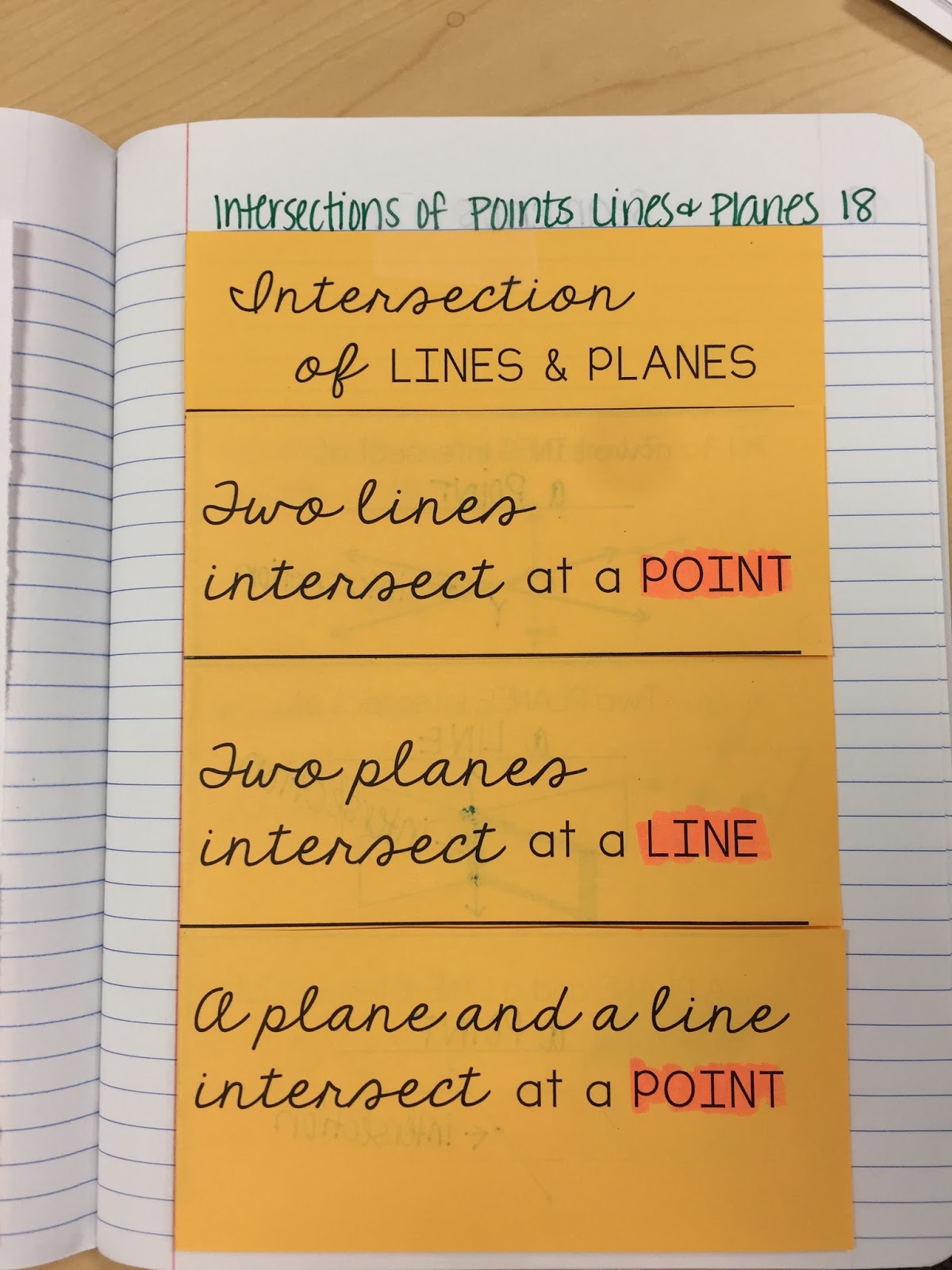
Day 2: First, students walked in and logged on to Google Classroom to complete a quick warm-up on Google Forms to review the naming and definitions of Points, Lines, and Planes. We went over two foldables: Collinear and Coplanar foldable and the Intersection of Lines and Planes foldable.You can find the original post with the foldables when you click here. 


After we completed the foldables, students logged on to Google Classroom to work on the following Collinear and Coplanar activity. Students really enjoyed this activity and I was surprised to find out that almost half of my students did not know how to insert text! After the activity, we had time left so we experimented with Google Draw. I had students create their own vocabulary terms and label them. I forgot to take pictures but I highly recommend trying Google Draw in a lesson that requires visuals. You can find the Google activity when you click here. 


Day 3: Students did one of my favorite activities EVER... Points, Lines, and Planes Gallery Walk. Students have to work in groups to come up with a new answer and they rotate through the problems. I posted this activity in this post.You can find the directions and files to this activity when you click here. 


Day 4:We went over the segments foldable together as a class and then I projected a powerpoint where students had to figure out which box the problem would go under (left side). After the foldable, students completed a cut and paste activity in their notebook where they had to match up the correct diagram, equation, and variable. I had one reader comment on a post where she only gave students the left side. I think that is a great idea and I will try it next year. You can find the original post with the files when you click here. 


Day 5: Students logged on to Google Classroom and completed a digital task cards activity over segments on Google Slides. I had students answer the task cards on Google Forms. I added Flubaroo to my Google Forms spreadsheet for easy grading. :) Students really enjoyed completing the digital task cards and I will definitely be using these again. I know there was a typo on one card, but I can't remember which one. If you find it, please let me know and I will fix it. 


Day 6: We completed a stations review activity. I made this into a Google Slides activity (trying to use the Chromebooks as much as we can before I have to give them back).


How do your students do on Geometry Basics?  My students performed better this year than previous years. I know that we will probably be combining segments and angles into one big "geometry basics" unit. Just worried about my ELL kids and special education students. 


2